

Blog

Best Construction Site Security Cameras in 2026 | Guide

Feature Webinar: Ask the Expert: Multi-Family Must-Knows About Pool Safety
‍Thursday, April 3rd, 12PM ET / 9:00 AM PST
Register Here
6 Mins

‍

If you're shopping for construction site security cameras this year, here's the short version: the camera itself matters less than you'd think. Most jobsites have no power, no internet and nobody around after 5 p.m., so the setups that work are self-powered, connect over cellular, and pair a couple of fixed bullet cameras with a PTZ. What actually stops a theft is the AI software behind those cameras, and the live guard who can step in while it's still happening.

Construction sites are some of the easiest commercial targets in America. The National Equipment Register (NER) and NICB have estimated that $300 million to $1 billion in construction and farm equipment is stolen every year, across 11,000+ reported thefts, and only about 1 in 5 stolen machines is ever recovered (BuildingSecurity.com, citing NER/NICB). That figure leaves out copper wire, tools, fuel and the schedule delays that follow every break-in.

The problem is not slowing down. Industry sources report that jobsite theft roughly doubled from 2024 to 2025 and metal theft rose 77% (BuildingSecurity.com), even as overall U.S. property crime fell. With copper near record prices, an unguarded site at 2 a.m. is an open invitation.

This guide covers what makes construction sites so hard to secure, what to look for in construction site security cameras, the camera layout we recommend, and how to cover a site that has no power or internet at all.

‍

Why construction sites are so hard to secure

A retail store or office has walls, a power outlet and an internet drop. A jobsite usually has none of those, and it changes shape every few weeks. Four problems shape every buying decision.

1. No power and no internet

On a greenfield site, the nearest outlet may be a temporary pole that won't be energized for months. Trenching power and running fiber to a camera can cost more than the camera itself, and that work gets torn out when the project closes. Any construction site security camera you choose must run on solar and battery, and send video over cellular, with Starlink satellite as a backup when the cell signal is weak or drops.

2. Large, shifting perimeters

Laydown yards, equipment staging, material containers and the building pad can sprawl across many acres. Fences get moved as phases change. Fixed cameras mounted on a structure that doesn't exist yet are not an option. Coverage has to be portable and easy to reposition.

3. After-hours vulnerability

Most sites sit empty from roughly 5 p.m. to 6 a.m. and all weekend, which is most of the week. Industry sources flag August as the peak month for jobsite theft (BuildingSecurity.com). A camera that only records lets you watch the theft the next morning. By then the excavator is gone, and fewer than 25% of stolen machines come back (NER, via National Law Review).

4. High-value, easy-to-move targets

Copper wire, generators, compact track loaders, tools and catalytic converters are portable and easy to resell. Thieves often scout a site during the day, so visible deterrence matters as much as recording.

The takeaway: on a jobsite, the camera is only as useful as the power, connectivity and response that come with it.

‍

What to look for in construction site security cameras in 2026

Use this checklist when comparing systems. The first three items rule out most consumer and retail-grade cameras.

Requirement Why it matters on a jobsite What good looks like
Off-grid power Temporary power is unreliable or absent Solar plus lithium (LiFePO4) battery storage, with a grid option when power arrives
Cellular connectivity No fiber or Wi-Fi on site 5G with 4G LTE failover, Starlink satellite backup for remote or low-signal sites, and local recording if every link drops
AI detection Theft is a constant at night, and police must prioritize life-safety calls over property crime, so contractors have to protect their own sites AI that spots people and vehicles after hours the moment they enter, so a guard can intervene right away; tuned on site by an experienced installer
Live intervention Recording alone doesn't stop a theft in progress Remote guards who can talk down, trigger strobes and call police
Weather rating Sites see heat, cold, dust and rain Rated enclosures and an operating range around -4°F to 122°F
Portability Perimeters change by phase Pole- or structure-mounted enclosures you can move in hours
Cloud access Superintendents, PMs, owners and insurers need alerts and footage wherever they are, and footage must survive if on-site hardware is stolen or damaged Alerts and live login from anywhere in the world on any device; redundant, encrypted cloud storage for 30+ days; unlimited users with no per-seat fees
Camera flexibility Every site is different, and each risk calls for the right tool for the job A camera-agnostic platform that lets you mix thermal, LPR, bullet and PTZ cameras per site and adapt as the job changes

One more test: ask how the vendor handles an alert at 2 a.m. If the answer is "you get a push notification," the system depends on a tired superintendent waking up. That is a gap, not a security plan.

‍

Bullet, PTZ or dome: which cameras belong on a jobsite?

Most sites need a mix. Fixed cameras watch the places that matter around the clock; a PTZ follows what moves.

Camera type Best use on a construction site Limitation
Bullet Long, fixed views of gates, fence lines, laydown yards and container rows; strong IR at night Sees only one direction
PTZ (pan-tilt-zoom) Tracking a person or vehicle across a wide area; zooming in on faces and plates Can only look one way at a time, so it needs fixed cameras beside it
Dome Vandal-resistant coverage at lower heights or near offices and trailers Shorter range than a bullet
LPR Logging every vehicle at the site entrance Single-purpose; needs a controlled entry point

Our recommended setup: two bullets and one PTZ on a Powered Enclosure

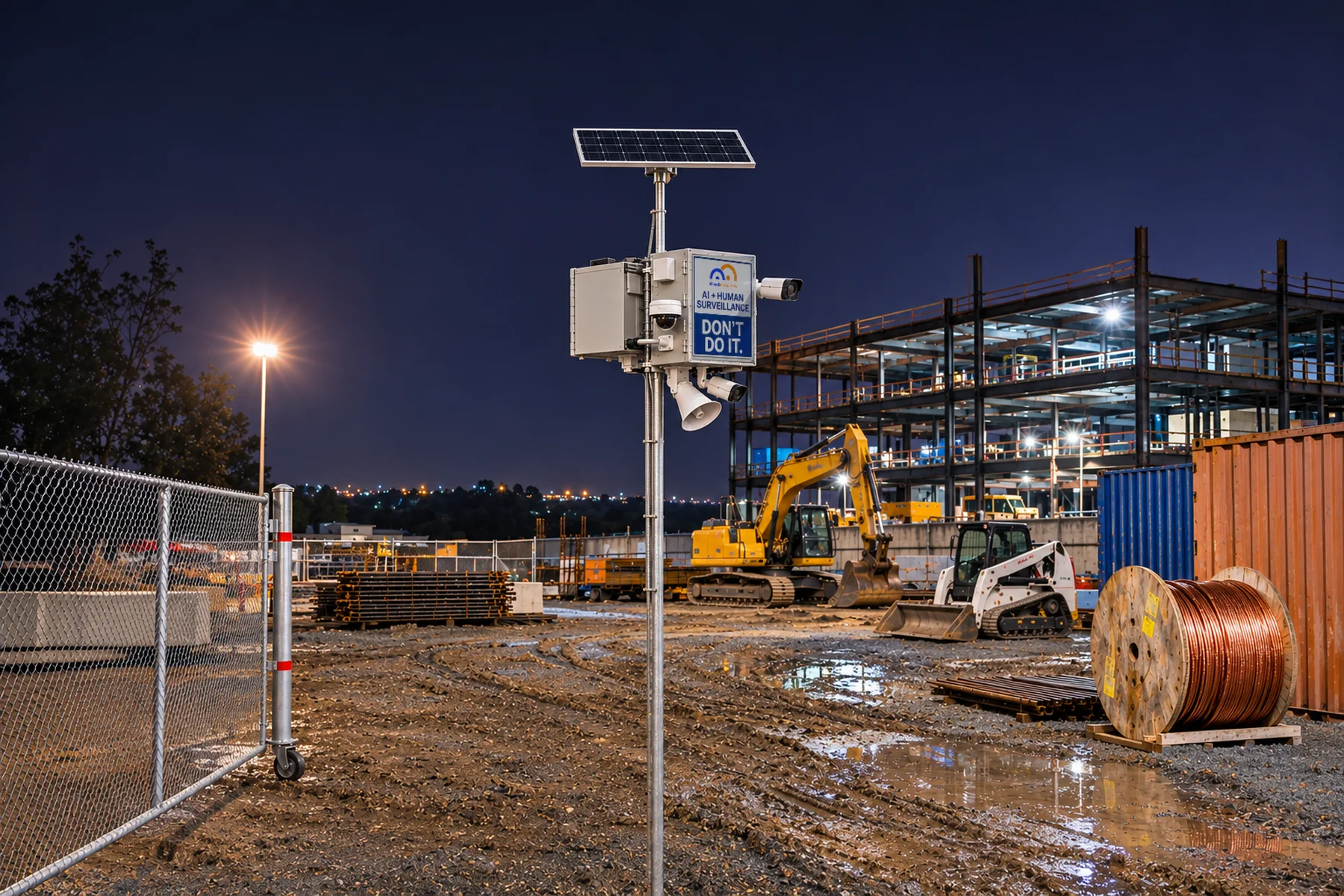
For most construction sites, we recommend mounting two bullet cameras and one PTZ camera on Cloudastructure's Powered Enclosure. The two bullets lock onto fixed high-risk zones, such as the main gate and the equipment yard. The PTZ covers the wide area between them and zooms in when the AI flags someone. Nothing goes unwatched while the PTZ is tracking.

The Powered Enclosure is a pole- or structure-mounted box that brings power, connectivity and AI to the cameras wherever you put them (Cloudastructure):

  • Power anywhere: a 48V 50Ah LiFePO4 battery with an integrated heater, charged by solar, battery or grid power (120V, 240V or 277V AC).
  • Up to four PoE+ cameras: dome, PTZ, bullet or LPR. The two-bullet, one-PTZ layout leaves a spare port for an LPR camera at the gate.
  • Built-in connectivity: 5G with 4G LTE failover or a Wi-Fi bridge, plus Starlink as a backup link where cell coverage is weak. No trenching or fiber runs.
  • Edge AI: an NVIDIA-powered compute module that analyzes video on the pole, plus an integrated strobe and 30 days of cloud storage.
  • Built for the weather: rated from -4°F to 122°F (-20°C to 50°C).

The enclosure is already protecting construction work. In January 2026, a national construction firm founded in 1989, with more than $2 billion in completed projects, deployed it at four sites across Illinois, Ohio and Maryland (Cloudastructure press release). A fully off-grid version with a 12-foot solar mast followed in February 2026 (Cloudastructure press release).

‍

Beyond hardware: the software brain matters most

In 2026, a 4K camera from one brand looks a lot like a 4K camera from another. Lenses, sensors and night vision have become commodities. What separates a system that stops theft from one that only records it is the software behind the cameras.

That software brain does four jobs a camera can't do alone:

  1. Filters noise. AI separates a person climbing a fence from blowing tarps, animals and passing headlights, so guards see real threats, not hundreds of false alerts.
  2. Responds in real time. When the AI detects a threat, it sends an alert to a remote guard who confirms it and can then speak through on-site speakers, trigger strobes and sirens, and call police while the intruder is still on site.
  3. Search in Seconds. Rapid search finds a person, vehicle or event across every camera in seconds, so guards can track a threat in real time, not just pull clips for police and insurers after the fact.
  4. Universal View of All Sites. A single cloud dashboard covers every jobsite, so a regional manager can check five projects from a phone.

Cloudastructure reports a 99% deterrence rate with its AI and remote guarding, with fewer than 1% of incidents needing an emergency dispatch call and up to 40% lower on-premises guard costs (Cloudastructure Construction Security). Its Power of Remote Guarding report explains how live intervention works.

Why camera-agnostic matters

Because the value lives in the software, you shouldn't have to rip out cameras to get it. Cloudastructure's platform is camera-agnostic: it works with about 99% of commercial-grade cameras, and even analog cameras through an encoder (Cloudastructure FAQ). As the company's CRO put it, the platform is "designed to serve as the intelligence layer behind virtually any security hardware" (Cloudastructure press release).

For contractors, that means cameras already on a trailer, a yard or a finished building can join the same system. You pay for intelligence, not another round of hardware. Before you buy, Cloudastructure's guide What to Look for in an AI Surveillance Provider lists the questions worth asking any vendor.

‍

No infrastructure? Skip the trailer and mount a Powered Enclosure

On day one of a project there's often no power and no network. Many contractors reach for a mobile surveillance trailer by default. The Powered Enclosure gives you the same plug-and-play coverage at a lower cost, and puts cameras exactly where the risk is, high enough that no one can reach them.

Factor Mobile surveillance trailer Cloudastructure Powered Enclosure
Cost You pay for a chassis, mast, generator and towing on top of the cameras You pay for cameras, power, connectivity and AI, not a vehicle
Placement Only where a truck can tow and level it On a pole, fence post, light standard or structure, right at the gate or yard
Footprint Takes up laydown or parking space Takes up no ground space
Power Solar and batteries, often backed by a fuel generator that needs refilling Solar, battery or grid (120V, 240V or 277V AC); no fuel runs
Coverage One mast per location Add enclosures zone by zone as the site grows
Height and tampering Thieves can climb onto the trailer to cover or damage the cameras, and the trailer itself is a towable asset Mounted high on a pole or building, well out of reach
Intelligence Depends on the provider NVIDIA-powered edge AI on board, plus live remote guarding

When the site expands, add another enclosure. When permanent power arrives, switch the same unit to grid power. The software brain stays the same while the coverage grows with the job.

‍

The bottom line

The best construction site security cameras in 2026 are the ones that keep working when nobody is on site. That means off-grid power, cellular connectivity and smart placement: two bullets and one PTZ on a Powered Enclosure covers most gates and yards. But the decision that matters most is the software. AI detection and live remote guarding turn a camera from a witness into a deterrent.

Cloudastructure's camera-agnostic platform runs the same intelligence across every Powered Enclosure and any other camera on your sites, so your security grows with the project instead of being rebuilt at each phase.

Ready to protect your next jobsite? Book a call or watch the demo to see how it works.

‍

Construction site security cameras: FAQ

What are the best construction site security cameras in 2026?
The best setup is a solar- or battery-powered, cellular-connected system with AI detection and live remote guarding. For most sites, two bullet cameras and one PTZ on a powered enclosure give the best mix of fixed coverage and tracking.
How do security cameras work on a site with no power or internet?
They run on solar panels and lithium batteries, and send video over 5G or 4G LTE cellular, with Starlink satellite as a backup where cell coverage is weak. Cloudastructure's Powered Enclosure works fully off-grid, and video is stored locally if the signal drops, then uploaded when it returns.
How many cameras does a construction site need?
It depends on size and layout, not acreage alone. Start with every entry point, then each high-value zone (equipment, materials, fuel). A single enclosure with two bullets and one PTZ can often cover a gate and yard together.
Do I need to replace my existing cameras?
Not with a camera-agnostic platform. Cloudastructure works with about 99% of commercial-grade cameras, so existing cameras can join the same AI and remote guarding system.
Are security cameras alone enough to stop construction theft?
No. Recording helps after the fact, but fewer than 1 in 4 stolen machines is recovered. Cameras stop theft when AI flags the intruder and a live guard intervenes in real time.
How much does construction site surveillance cost compared to guards?
Cloudastructure reports up to 40% lower on-premises guard costs and up to 75% lower total cost of ownership than other systems. Exact pricing depends on site size and hardware.

‍

Sources

‍

Experience why businesses choose Cloudastructure for video security and management.

Offices across the globe.

AUD

NYC

CHN

EU

Webinar: The Risk Ahead: 2027 Security, Liability & Loss Prevention
Register Now
Upcoming Webinar: Can AI Stop Cargo Theft? What Works, What Doesn't & Where AI Fits Register Now
Upcoming Webinar: Graying Residents — Seniors, Safety & Liability in Property Management Register Now
End of Year offer
Protect Now, Pay in 2026
Stay ahead of crime this holiday season with Cloudastructure’s AI Surveillance, and defer all payments until 2026.
Claim Offer Now
Shopping for AI Surveillance?
Not all of it is created equal. Grab our free cheat sheet with the 6 questions to ask every provider, plus what a good answer looks like.
Get the Free Cheat Sheet